New Screen to Check TA Data
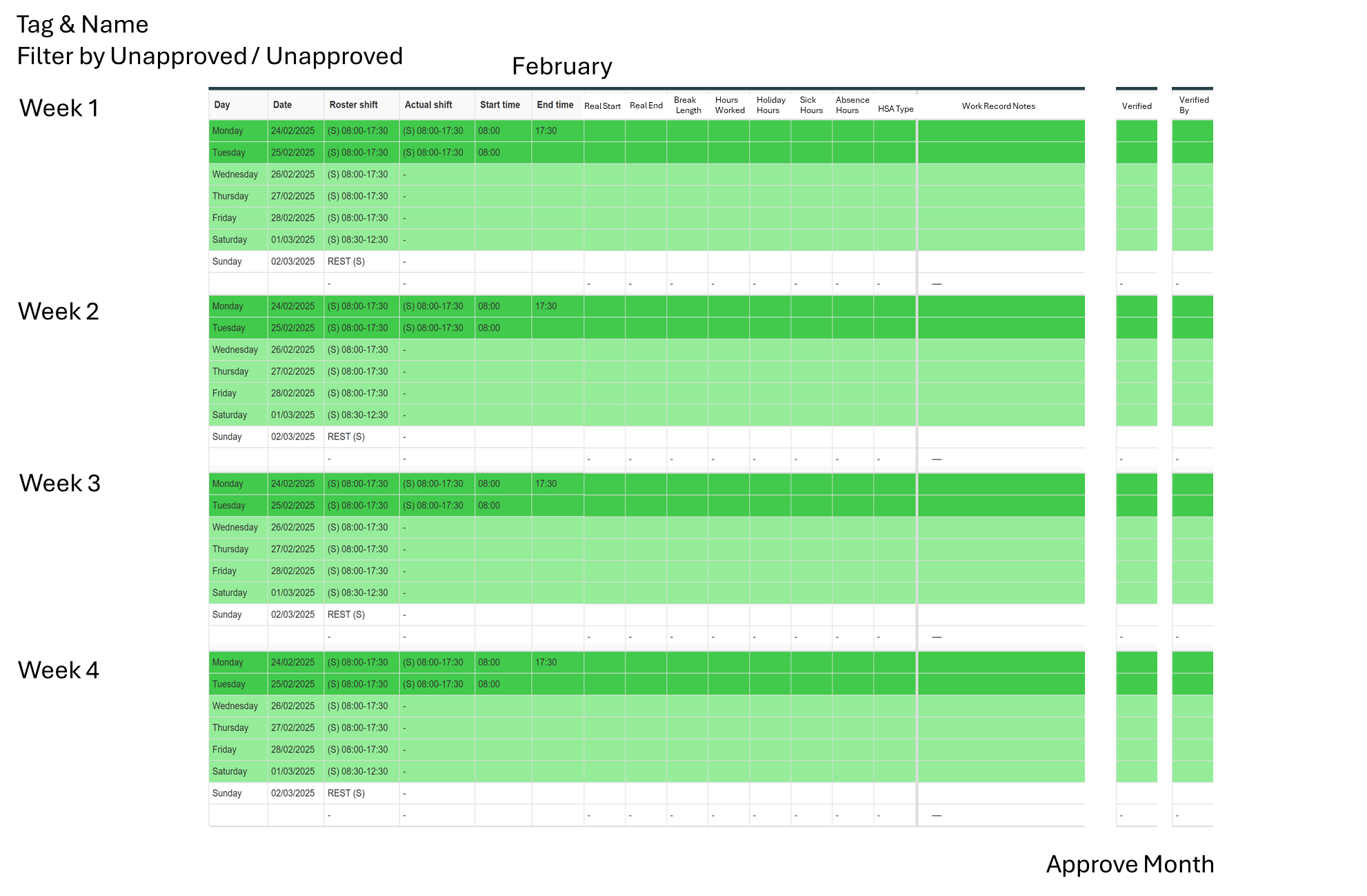
A screen that allows Months to be manually approved for Payroll
This would be great for hourly staff, I imagine it looking like the image above
For this to work, there must be a way to approve or verify a month, and then filter by verified months and months that need to be verified
We should be able to click into each day to show the work record, similarly to the live data Screen
The system should log who the month or shift has been verified by
We should also be able to swap between a month view and a week view to suit each business needs
Whilst i haven’t included it in the image, it should include an overtime hours column with an overtime summary at the end of each week, showing which overtime goes in which OT rate
Alongside this, it would be a good idea to add in automatically locking shifts, so you could set all the shifts from the previous month / week to lock on a specific date, meaning you could look through this screen knowing that the manager wont be able to change any data later down the line
I appreciate this would be a good amount of work, but as there is no easy way in chronicle to check TA data this would be extremely helpful to validate overtime, holiday, sick, absence and basic hours before running payroll
Log in to comment and vote
Comments2
Chronicle
Mar 7, 2025
Also the option to verify by a week is already in Chronicle see screenshots and there is an accompanying report clockcard 3 in basic reports to show who has authorised or items outstanding.
Chronicle
Mar 7, 2025
Hi Lewis, we understand the point you are making and this is something we possibly could consider adding to Chronicle in the future however fundamentally Chronicle has been designed to work using a ‘manage by exception principle’ not ‘overseeing every detail’ principle.
Please see the detailed explanation below as to the benefits of managing by exception and argument for. Note this approach does require shifts and rosters to be set up in a customers environment, so maybe for open-rostered clients, the idea you have suggested would have much more application.
Managing by Exception in a Time and Attendance System
Managing by exception is a management principle that focuses attention on significant deviations from expected outcomes rather than overseeing every detail. In the context of a time and attendance system, this approach means automating routine approvals and only intervening when necessary, improving efficiency while maintaining control.
Key Principles of Managing by Exception in Time & Attendance:
Automated Compliance Checks
The system enforces policies such as working hours, overtime limits, and break rules.
If an employee follows the rules, no approval is needed.
Exceptions (e.g., missed punches, excessive overtime, or policy violations) trigger alerts.
Threshold-Based Alerts & Notifications
Managers are only notified when an employee’s hours exceed predefined limits, arrives late frequently, or takes unapproved leave.
Custom thresholds reduce unnecessary reviews while maintaining oversight.
Self-Service & Employee Accountability
Shift swaps, time-off requests, and approvals are handled through the system, only escalating when policy violations occur.
Rules-Based Approvals
Pre-approved schedules, overtime, and shift changes occur automatically if within defined guidelines.
Managers only review and approve exceptions, like excessive overtime or unauthorized leave.
Data-Driven Decision Making
Reports highlight attendance trends, chronic lateness, and compliance risks.
Managers focus on problematic patterns rather than individual approvals.
Benefits of Managing by Exception in Time & Attendance:
✅ Efficiency: Reduces the need for micromanagement, allowing managers to focus on critical tasks.
✅ Fairness: Ensures consistent application of policies without subjective decisions.
✅ Accuracy: Reduces human error in approving hours and exceptions.
✅ Scalability: Works efficiently for large workforces without overwhelming managers.
Example in Action:
A retail store uses an automated time and attendance system.
Employees clock in and out as per policy—no manager intervention is needed.
If an employee forgets to clock in, the system notifies them first for self-correction.
If an employee exceeds overtime limits, the system alerts the manager for approval.
If a chronic pattern of lateness emerges, HR receives a report for action.
By managing by exception, businesses streamline workforce management, reduce administrative burden, and ensure compliance without unnecessary approvals.